TL;DR:
- Many dental practices waste money on Google Ads because of poor targeting and landing page mismatches. Focusing on local intent, using precise keywords, and optimizing landing pages can significantly improve conversion rates. Regular tracking and refinement are essential for sustained growth and maximizing ROI.
You’re paying for clicks, but your phone isn’t ringing. That’s one of the most frustrating situations a dental practice can face: a real budget going toward Google Ads with little to show for it. The good news is that wasted ad spend almost always comes down to fixable problems, not bad luck. This guide walks you through exactly how to set up, manage, and improve Google Ads campaigns that bring qualified local patients through your door, not just traffic to your website.
Table of Contents
- Understanding Google Ads: What dentists need to know
- Setting up your first dental-focused campaign: Step-by-step
- Optimizing for results: Tracking, refining, and growing
- Avoiding costly mistakes: Troubleshooting your dental ads
- Our take: What most dental Google Ads guides won’t tell you
- Ready to grow your practice? Get expert Google Ads help
- Frequently asked questions
Key Takeaways
| Point | Details |
|---|---|
| Choose the right campaign type | Search campaigns offer dentists more control and better patient targeting than Smart campaigns. |
| Optimize landing pages | Landing pages must be fast, mobile-friendly, and perfectly match your ads for best results. |
| Track conversions smartly | Focus on qualified leads by setting up conversion tracking for calls and forms. |
| Refine and avoid pitfalls | Constantly tweak keywords, budgets, and targeting while avoiding mismatched ads and sites. |
Understanding Google Ads: What dentists need to know
Now that you know why getting Google Ads right matters for your practice, let’s break down the fundamentals, especially where dental campaigns require a different approach.
Google Ads is a pay-per-click (PPC) platform where you bid on specific keywords so your ad appears when someone nearby searches for dental services. Understanding the key terms is the first step toward making informed decisions about your campaigns. Start with your dental marketing basics before investing in paid ads.
Key terms every dentist should know:
- Keywords: The search phrases that trigger your ad, such as “dentist near me” or “emergency dental care in [city].”
- Ad groups: Collections of related ads and keywords organized around a theme, like “teeth whitening” or “family dentistry.”
- Bidding: How much you’re willing to pay per click; Google’s auction system determines when and where your ad shows.
- Budget: Your daily or monthly spending cap across all campaigns.
- Quality Score: A rating Google assigns based on your ad relevance, click-through rate, and landing page experience. Higher scores mean lower costs.
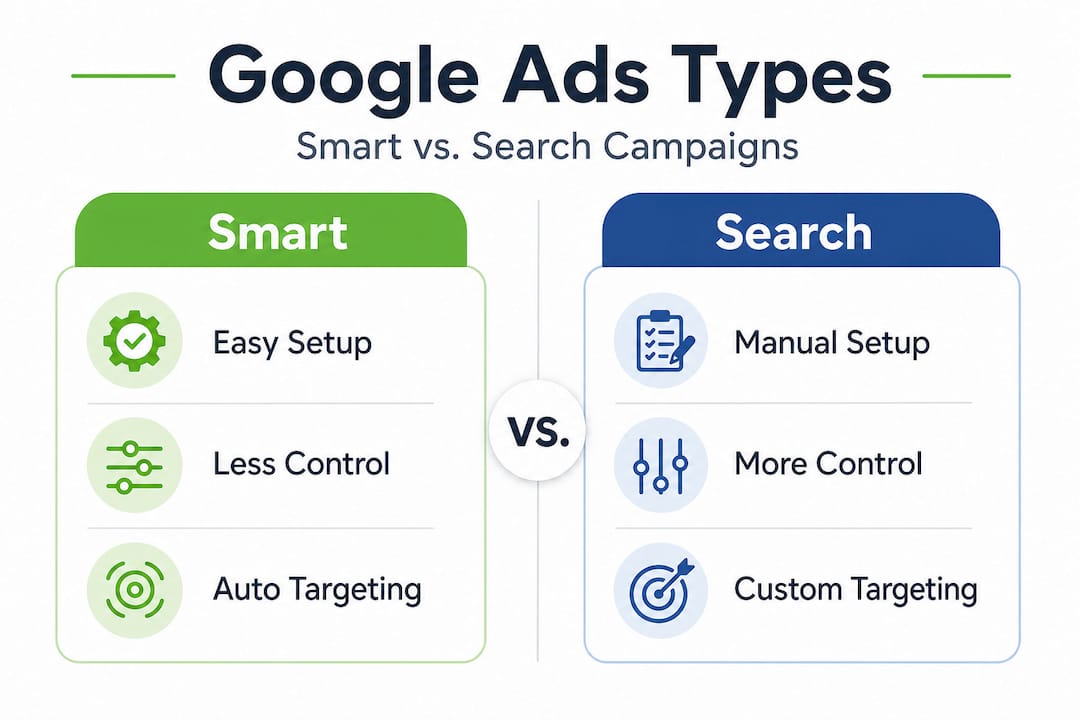
One of the most important decisions you’ll make is choosing between Smart campaigns and Search campaigns. Here’s how they compare:
| Feature | Smart campaigns | Search campaigns |
|---|---|---|
| Setup complexity | Low (Google manages most settings) | Moderate (you control keywords and bids) |
| Keyword control | Limited | Full control |
| Best for | Beginners with small budgets | Dentists targeting specific patient needs |
| Targeting precision | Automated | Manual and granular |
| Reporting detail | Basic | Detailed |
As Google’s own guidance notes, Smart campaigns automate settings for beginners but offer less control. For dentists who want to target specific keywords like “invisalign consultation” or “pediatric dentist open Saturday,” Search campaigns give you the precision you need. Smart campaigns can work as a starting point, but they often waste budget on irrelevant searches you can’t easily filter out.
Pair your paid strategy with SEO marketing for dentists for the strongest long-term results. Paid ads drive immediate visibility; SEO builds lasting authority.
Setting up your first dental-focused campaign: Step-by-step
Grasping the terminology sets the stage. Next, walk through the actual process for building a campaign that gets noticed by potential patients in your area.

Step 1: Choose keywords with strong local patient intent
Don’t target generic terms like “dentist” on their own. Instead, focus on phrases that signal a person is ready to book, such as:
- “emergency dentist [city name]”
- “affordable family dentist near me”
- “teeth cleaning appointment [neighborhood]”
- “same-day dental appointment [zip code]”
Use Google’s Keyword Planner (free inside your Ads account) to find search volume and estimated cost per click for your area. Prioritize keywords with clear intent over high-volume terms with vague meaning. Consider your local SEO strategies as a complement to keyword research, since both disciplines draw from the same patient search behavior.
Step 2: Write ad copy that speaks to real patient concerns
Your headline gets about three seconds of attention. Use it wisely. Effective dental ad headlines address a specific need and include a clear offer. For example:
- “New Patient Special: $99 Cleaning and Exam”
- “Emergency Appointments Available Today”
- “Accepting New Patients in [City Name]”
Include a description that reinforces the offer, mentions your location, and ends with a strong call to action like “Book Online Today” or “Call to Reserve Your Spot.” Specificity converts better than vague claims.
Step 3: Build a landing page that earns trust
This step is where most practices lose new patients after getting clicks. Google’s landing page guidelines are clear: landing pages must match the ad’s promise, load in under three seconds, be mobile-optimized, include a clear call to action, and feature trust signals such as patient reviews and professional credentials.
Here’s a simple data summary of what high-performing dental landing pages include:
| Landing page element | Why it matters |
|---|---|
| Load time under 3 seconds | Reduces bounce rate, improves Quality Score |
| Mobile-responsive design | Over 60% of local searches come from mobile devices |
| Matching headline | Confirms to the visitor they’re in the right place |
| Patient reviews or star ratings | Builds immediate trust before a first visit |
| Prominent phone number or booking form | Reduces friction to conversion |
| Doctor credentials or certifications | Establishes authority and reassures new patients |
Never send paid traffic to your home page. Create a dedicated page for each campaign or ad group so the message stays consistent from click to conversion.
Step 4: Set a realistic daily budget
A common mistake is starting with too small a budget to gather meaningful data, or too large a budget before your campaign is proven. Start with $20 to $40 per day, which translates to roughly $600 to $1,200 per month. This gives Google’s algorithm enough data to optimize while keeping your risk manageable.
Pro Tip: Set your ads to run only during the hours your front desk can answer the phone. Running ads at 2 AM when no one can respond to an inquiry wastes budget and frustrates potential patients.
Optimizing for results: Tracking, refining, and growing
With your ads live, data begins pouring in. But which numbers matter, and how do you use them to steadily grow your patient base?
The most valuable metric for a dental practice isn’t impressions or even clicks. It’s conversions, meaning real actions taken by real people who could become patients. Setting up proper conversion tracking is non-negotiable.
How to set up conversion tracking the right way:
- Phone call tracking: Use Google’s forwarding numbers to track calls generated by your ads. According to Google Ads call tracking, you should set a minimum call duration of over 60 seconds to qualify as a meaningful lead. A five-second call is likely a wrong number, not a new patient.
- Form submissions: Set up a “Thank You” page on your website after someone submits an appointment request. Track visits to that page as a conversion.
- Online booking clicks: If you use an online scheduler, track clicks to that tool as a micro-conversion.
Once tracking is live, review your data weekly for the first month. Look for these specific signals:
- High impression, low click-through rate (CTR): Your ad copy isn’t compelling enough. Test a new headline.
- High CTR, low conversions: Your landing page isn’t delivering on the ad’s promise. Review the alignment between your ad and your page.
- Expensive keywords with no conversions: Pause them and reallocate budget to what’s working.
Statistic to keep in mind: Dental practices that track phone call conversions with a minimum duration filter report up to 30% fewer false leads counted in their data, giving them a much cleaner picture of actual return on investment.
Use Google Ads management tips to stay current on best practices as Google’s platform continues to evolve. Pair your ads with SEO services for dentists to reduce your long-term cost per new patient over time.
Pro Tip: Don’t track more than three to five key metrics at a time. Too many data points create paralysis rather than clarity. Focus on cost per conversion, call quality, and conversion rate first.
Avoiding costly mistakes: Troubleshooting your dental ads
Once you’ve implemented tracking and optimization, avoid backsliding by recognizing and addressing common stumbling blocks.
Even well-structured campaigns can bleed budget when a few critical issues go unchecked. Here are the most damaging mistakes dental practices make and how to fix each one.
Common mistakes and their solutions:
- Ad and landing page misalignment: If your ad promotes a “$99 new patient special” but your landing page shows your full fee schedule, visitors feel misled and leave. Every ad should point to a page built specifically around that offer.
- Ignoring negative keywords: Negative keywords prevent your ads from showing for irrelevant searches. Without them, you could be paying for searches like “dental schools,” “dental assistant jobs,” or “free dental clinics,” none of which are your target audience. Add a negative keyword list from day one and update it weekly.
- Overspending from broad match targeting: Broad match keywords cast a wide net and can trigger your ads for searches that have nothing to do with your practice. Use phrase match or exact match keywords, especially when starting out, to keep spending focused.
- Neglecting mobile users: Mobile is where the majority of local searches happen. If your ads look great on desktop but your landing page loads slowly on a phone or requires excessive scrolling to find the phone number, you’re losing patients before they ever contact you.
As Google’s quality guidelines emphasize, mobile optimization and fast load times are foundational, not optional extras.
“Negative keywords are the most underused tool in dental Google Ads. A practice spending $1,500 a month can easily save $300 to $400 simply by filtering out searches that will never convert.”
Refer back to your comprehensive dental marketing plan regularly. Your Google Ads strategy should align with your broader patient acquisition goals, not operate in isolation.
Our take: What most dental Google Ads guides won’t tell you
Most guides focus on mechanics: set up your campaign, pick your keywords, write your ads. That’s necessary, but it’s incomplete. Here’s what we’ve actually observed working with local practices over time.
The traffic trap is real. Many dentists measure success by how many people visited their website after clicking an ad. That number feels good, but it’s misleading. What you really need to know is how many of those visitors booked an appointment. A campaign getting 500 clicks a month and generating two bookings is far worse than one getting 80 clicks and generating 15 bookings. Quality over quantity is not a cliché here. It’s the actual bottom line.
Hyper-local targeting is underused. Most dental practices serve patients within a five to ten mile radius. Yet many campaigns target an entire metro area or even a full city. Tighten your geographic radius, use location-specific ad copy, and mention neighborhood names in your headlines. “Dentist serving Riverside Heights” converts better than “dentist in Chicago” because it speaks directly to the person’s daily geography.
Differentiation matters more than you think. If every dental practice in your area runs ads saying “accepting new patients” and “caring team,” you blend into background noise. Identify what genuinely sets your practice apart, whether it’s extended hours, sedation dentistry, bilingual staff, or a specific specialty, and lead with that in your ads.
The combination effect is powerful. Practices that pair Google Ads with strong online reviews and solid SEO vs. Google Ads strategies consistently outperform those relying on ads alone. When someone clicks your ad and then sees your Google Business Profile with 200 five-star reviews, conversion becomes much easier. Ads bring the visitor; trust closes the booking.
Ready to grow your practice? Get expert Google Ads help
You now have a clear roadmap: the right campaign type, the right keywords, a high-converting landing page, and a tracking system that shows real results. Applying all of this consistently is where the real growth happens.
If you want to accelerate that growth without managing the complexity yourself, our team specializes in expert Google Ads management built specifically for practices like yours. We handle keyword research, ad copy, bidding strategy, and conversion tracking so you can focus on your patients. If you’re curious about how Google Ads advance your business goals beyond just clicks, we’re ready to show you the strategy behind sustainable patient growth. Reach out today and let’s build a campaign your practice can count on.
Frequently asked questions
What budget should a dentist set for Google Ads?
A good starting point is $500 to $1,000 per month, but your ideal budget depends on your local competition and how aggressively you want to grow your patient base.
How can I measure the real return on my dental Google Ads?
Track calls and appointment form submissions using Google Ads conversion settings. For calls, set a minimum duration of over 60 seconds to filter out low-intent contacts and get an accurate picture of real leads.
Should I use Smart campaigns or Search campaigns for my practice?
Search campaigns give you far more control over keywords and targeting. As Google notes, Smart campaigns suit beginners but limit your ability to target specific patient searches, which matters for local dental practices.
Why do my ads get clicks but no bookings?
Your landing page likely doesn’t align with the ad’s promise, or it lacks clear calls to action and trust signals. According to Google’s landing page standards, pages must load fast, be mobile-friendly, and directly reflect what the ad offers.
What is the biggest mistake dentists make with Google Ads?
The most common issue is skipping negative keywords and targeting too broad an audience, which drains budget on searches that will never turn into booked appointments.
Recommended
- Step-by-Step Dental Marketing Guide: Attract More Patients
- Local SEO For Dentists| ChitChat For Dental SEO
- SEO Marketing for Dentists: Convert Searches into Patients – ChitChat Marketing LLC

Thomas Guardado is a seasoned digital marketing and SEO expert with over a decade of hands-on experience helping brands grow their online presence and dominate search results. Based in Connecticut, he specializes in organic search strategy, technical SEO, content optimization, and data-driven campaigns that turn clicks into customers.


Leave a comment